Free online audio visualizer
Free online audio visualizer & waveform video maker
Music Waveform is a free online audio visualizer that turns any song, podcast or voice memo into an animated waveform video you can drop straight into your edit. Everything runs online in your browser, so your audio never leaves your device, and you export a ready-to-composite MP4 in a couple of clicks. No account, no watermark, no upload.
Workflow
How to make a waveform video
-
Load your audio
Drop in an MP3, WAV, OGG, M4A/AAC or FLAC file — or an MP4 or iPhone .mov. It’s decoded locally, right in the page.
-
Pick a style
Choose from sixteen waveform shapes and tune the colour, reaction and resolution while you preview in sync with playback.
-
Export to MP4
Render a clean MP4 on a black background, ready to composite over your footage in any video editor.
Styles
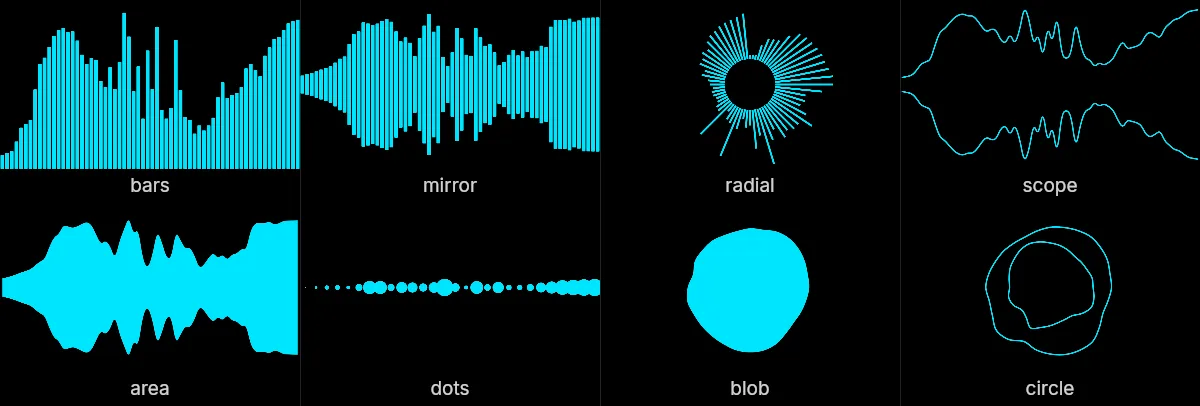
Sixteen waveform styles, one track
Capabilities
What you can do with it
-
Sixteen waveform styles
Bars, mirror, radial, scope, area, dots, blob and circle, each fully adjustable, plus eight more with the Pro add-on.
-
Real MP4 export
Hardware-accelerated H.264 encoding via WebCodecs, not a screen recording.
-
Private by design
No upload, no cloud, no signup. Your audio stays on your machine.
-
Sync preview
See the animation react to the track before you commit to an export.
-
One-click presets
Analysis and visual presets to get a great look in a single click.
-
Free forever
No watermark, no sign-up, no email required. Eight styles, every format, unlimited exports — that floor stays. Pro adds on top.
Good to know
Frequently asked questions
Is Music Waveform free?
Yes. The tool is a free online audio visualizer, with no account, no watermark, no export limit and no upload. It runs entirely in your browser. There is an optional one-time Pro add-on (€39) that adds eight more waveform styles, a background, album art, titles, a progress bar and 4K export. Where the line between free and Pro sits can change, but the free tier always keeps what a good-quality waveform video needs, and always keeps unlimited exports: nothing expires, and it is never a trial, a quota or a watermarked preview.
Which audio formats are supported?
You can load MP3, WAV, OGG, M4A/AAC and FLAC files — and video files too, including MP4 and the .mov an iPhone records, with the audio read straight from the track. Everything is decoded locally in your browser.
Where does my audio go, and is it uploaded?
Nowhere. All decoding, analysis, rendering and MP4 encoding happen on your device. Your audio file is never uploaded or stored on a server.
Which browser do I need to export an MP4?
Preview works in any modern browser. MP4 export uses the WebCodecs API, so it needs Chrome, Edge, Opera (or another up-to-date Chromium browser) or Safari 17+.
Can I convert an MP3 into an MP4 video?
Yes. Load your MP3, choose a waveform style, and export a ready-to-use MP4 video.
How do I put the waveform over my own video?
The MP4 exports on a black background. Drop it on top of your footage in your video editor and set the blend mode to “Screen”: the black disappears and only the colored waveform shows over your video.
Can I export a waveform with a transparent background?
Yes, two ways. WebM with an alpha channel gives you a truly transparent video that needs no blend mode, and works in Chrome, Edge and other Chromium browsers. Transparent frames (PNG) exports a .zip of transparent images that imports as an image sequence into any editor, and it is the one transparent path that also works in Safari and Firefox, though it needs a browser from 2023 or later and carries no audio track.
Which waveform styles are available?
Sixteen. Eight free: bars, mirror, radial, scope, area, dots, blob and circle. Eight more with the Pro add-on: ribbon, hexgrid, concentric, spiral, starburst, mesh, tunnel and bars3d. Each one takes the same color, reaction and resolution controls, and the preview updates live so you can click through them against your own track.
Can I export a MOV or ProRes file with an alpha channel?
No, and no browser tool can: the video encoders a browser exposes are H.264, VP9 and VP8 — ProRes is not among them. If your editor wants a true alpha asset, export Transparent frames (PNG) and import the .zip as an image sequence; Premiere Pro, Final Cut and DaVinci Resolve all accept one and it carries the transparency exactly, it just has no audio track. WebM with an alpha channel is the faster route if you are in Chrome, Edge or Opera and your editor reads VP9 alpha.
What resolution and bitrate can I export?
One-click presets cover 1920×1080 and 2560×1440, 1080×1920 for Shorts and Stories, 1080×1080, 1080×1350, 2560×1080 ultrawide, and 3840×2160 and 2160×3840 in 4K, and you can type any custom width and height instead. Free exports cap at 2560 px on the longest edge, and 4K comes with the Pro add-on. Bitrate runs from 1 to 30 Mbps and starts at 10, or at 16 once a photographic background is in the frame, which compresses far less kindly than a flat one. What actually finishes is a property of your device rather than of a server — a long track at 4K asks a lot of a phone.
Can I use the videos commercially, or on a monetized channel?
Nothing here restricts what you do with a video you export: no watermark, no licence on the output, no attribution asked. What you do need is the right to the audio you put in. The Terms put that on you, and a track you have no permission to use does not become usable because you added a waveform to it.
Does it need an internet connection?
Only to open the page. Decoding, analysis, rendering and encoding all run on your machine, so you can disconnect and keep working, and your audio is never sent anywhere. Two things do still use the network: anonymous usage counts (formats, durations, error reasons — never a filename or any audio), and, for the rare file whose audio your browser will not decode on its own, a small reader module fetched on demand. There is no app to install and no offline mode to turn on, so you do need a connection to load it the first time.
Scope
What it doesn't do
Worth knowing before you load a file, so you are not hunting for a control that was never there.
- Audio in, video out. It will not take a video file as input, and it does not cut or edit footage.
- No transcription and no captions. An audiogram made here carries the waveform, not subtitles.
- No stem separation — the shape reacts to the whole mix, not to one instrument.
- One file at a time. There is no batch mode, no API and no command line.
- Nothing renders on a server. That is the privacy guarantee, and it is also the ceiling: a slow device stays a slow device.
Music Waveform is a free online, privacy-first audio visualizer and waveform video maker. Made for musicians, podcasters and video editors.
Make a waveform