Compositing
How to Add a Waveform Over Your Video (Screen Blend Mode)
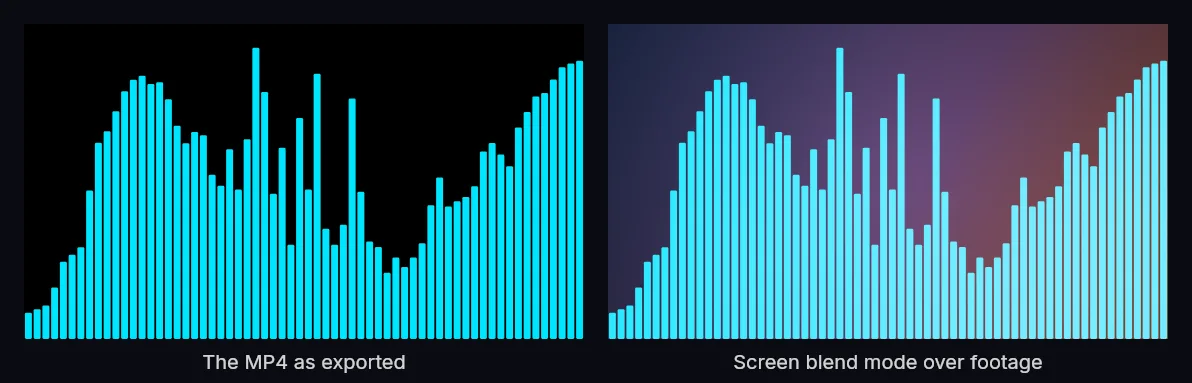
How do you put a waveform over your own video?Export the MP4 (it comes out on a black background), then put it on a layer above your footage in any video editor and set that layer's blend mode to Screen. Black is the neutral element of Screen, so it disappears and only the colored waveform shows.
If your editor has no Screen blend mode, export a WebM with a real alpha channel (Chromium browsers only) or a transparent PNG sequence (works everywhere) instead.
The waveform MP4 exports on solid black by design. That black isn't a limitation: it's what lets you drop the waveform on top of any video and have only the moving shape show through. The trick is one setting: the Screen blend mode.
Why the background is black
Compositing modes combine layers using math on pixel values. Screen lightens: a black pixel (value 0) adds nothing and becomes invisible, while bright pixels shine through. Exporting the waveform on black means that when you Screen it over your footage, the background vanishes and only the colored waveform remains.
Step by step (any editor)
- Export your waveform from Music Waveform, the free online audio visualizer, as an MP4 (it will be on a black background).
- In your video editor, place your background footage or image on the lower track.
- Place the waveform MP4 on the track above it.
- Select the waveform clip and set its blend mode to Screen.
- The black drops out, and the waveform now floats over your video.
The setting is called "Screen" in Premiere Pro, After Effects, DaVinci Resolve, Final Cut Pro (as a compositing/blend mode), CapCut and most other editors.
If that color constraint is a problem (you want a dark waveform, or you are compositing over a light background where Screen has nothing to do), you can skip the blend mode entirely and export with a real transparent background instead.
Troubleshooting
- The black is still showing: the blend mode isn't applied, or it's set to the wrong clip. Make sure Screen is on the waveform layer, not the background.
- The waveform looks faint: your color is too dark, so brighten it and re-export.
- Edges look slightly gray: that's normal with Screen; a brighter waveform color minimizes it.
Once this clicks, you can put a waveform over anything: a live performance clip, a static gradient, album art, or a looping background. It's the same technique behind most podcast audiograms.
Make your waveform video
Free, no signup, right in your browser. Load a track and export an MP4.
About this article: it was written with the help of AI (Claude) and published by Music Waveform. We review our posts for accuracy against how the tool actually works, but if you spot something off, email damienyvert.dev@gmail.com.