Design
How to Choose Colors for Waveform Videos That Pop
What color should a waveform video be?A bright, saturated one. The MP4 exports on black and is composited with the Screen blend mode, which adds light: a dark color has almost nothing to add, so it nearly vanishes over footage. Cyan, lime, amber and hot pink hold up; navy and deep purple do not.
Music Waveform warns you before exporting an MP4 in a color below a WCAG relative luminance of 0.25. The warning is skipped for the transparent formats, where real alpha keeps a dark color visible.
Color choice makes or breaks a waveform video, and not just for taste. Because these clips are usually composited with the Screen blend mode, some colors stay vivid while others quietly vanish. Here's how to pick ones that pop.
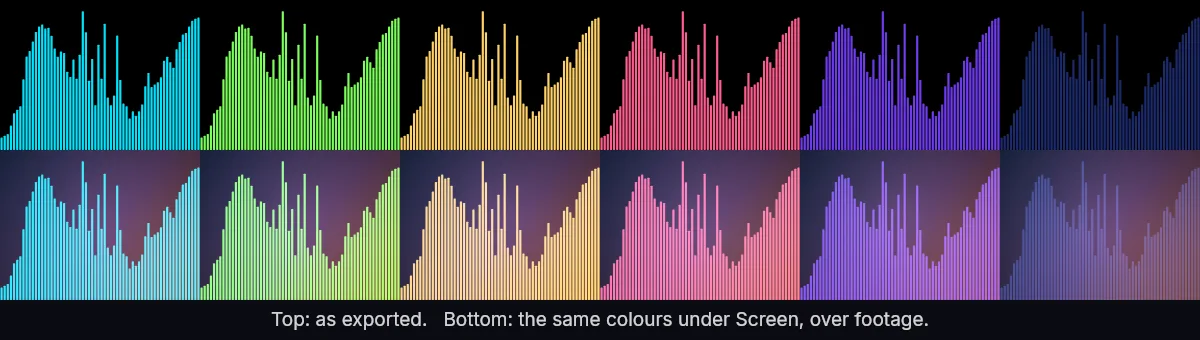
The Screen rule, in one line
Screen blending lightens based on luminance, so dark colors barely show up and pure black disappears entirely. A deep navy waveform over footage can look almost invisible; the same shape in bright cyan glows. When in doubt, go lighter and more saturated.
Colors that read well
- Bright cyan, aqua and electric blue: high luminance, reads on almost any footage.
- Warm whites and light golds: elegant and neutral.
- Hot pink, magenta and coral: punchy and on-brand for music.
- Lime and mint greens: fresh, great over darker backgrounds.
Colors to avoid (as-is)
- Navy, maroon, forest green and other dark tones: they sink into the background under Screen.
- Pure black, obviously: it becomes fully transparent.
- Muddy, desaturated mids: they look washed out once composited.
Match your background
If you'll place the waveform over a busy or bright background, boost contrast with a very light color or add a subtle glow in your editor. Over a dark or solid background you have more freedom, but bright still wins for that neon, energetic look. For platform-specific framing, see waveform videos for social.
New to the whole flow? Start with how to make a waveform video and experiment with color in the live preview before you export.
Make your waveform video
Free, no signup, right in your browser. Load a track and export an MP4.
About this article: it was written with the help of AI (Claude) and published by Music Waveform. We review our posts for accuracy against how the tool actually works, but if you spot something off, email damienyvert.dev@gmail.com.